CGI: DESIGN SYSTEM · INTERNSHIP · APR - JUNE 2023
Creating and documenting components for CGI's multi-device design system
CGI's file upload process was plagued with accessibility issues and a lack of clear usage guidelines. This led to longer onboarding times for new customers and challenges for existing ones. My redesign addressed these pain points which enhanced visual consistency across 7 CGI products and drove a 60% boost in development output.
Team
John - Senior designer / John - Senior designer / John - Senior designer / John - Senior designer
Skills
Design systems / Documentation
Role
UX Design Intern
Timeline
May - August 2023
[Problem] CGI's file upload process was plagued with accessibility issues and a lack of clear usage guidelines. [Insight] This led to longer onboarding times for new customers and challenges for existing ones. [Solution] By redesigning the component, I streamlined the file upload experience for end customers and fostered better collaboration among CGI's teams.
Team
CGI: Jess Naval – Sr. Design Manager / Akhil Krishnan - Design Lead/ Len Hall – Sr. Designer / Yumin Gang - Sr. Designer
CONTRIBUTIONS
Design documentation / Figma component creation / Competitive analysis / User testing
TOOLS
Figma - Components, variants, prototyping
Timeline
May - August 2023
3 ways my contributions improved CGI's design and development teams.
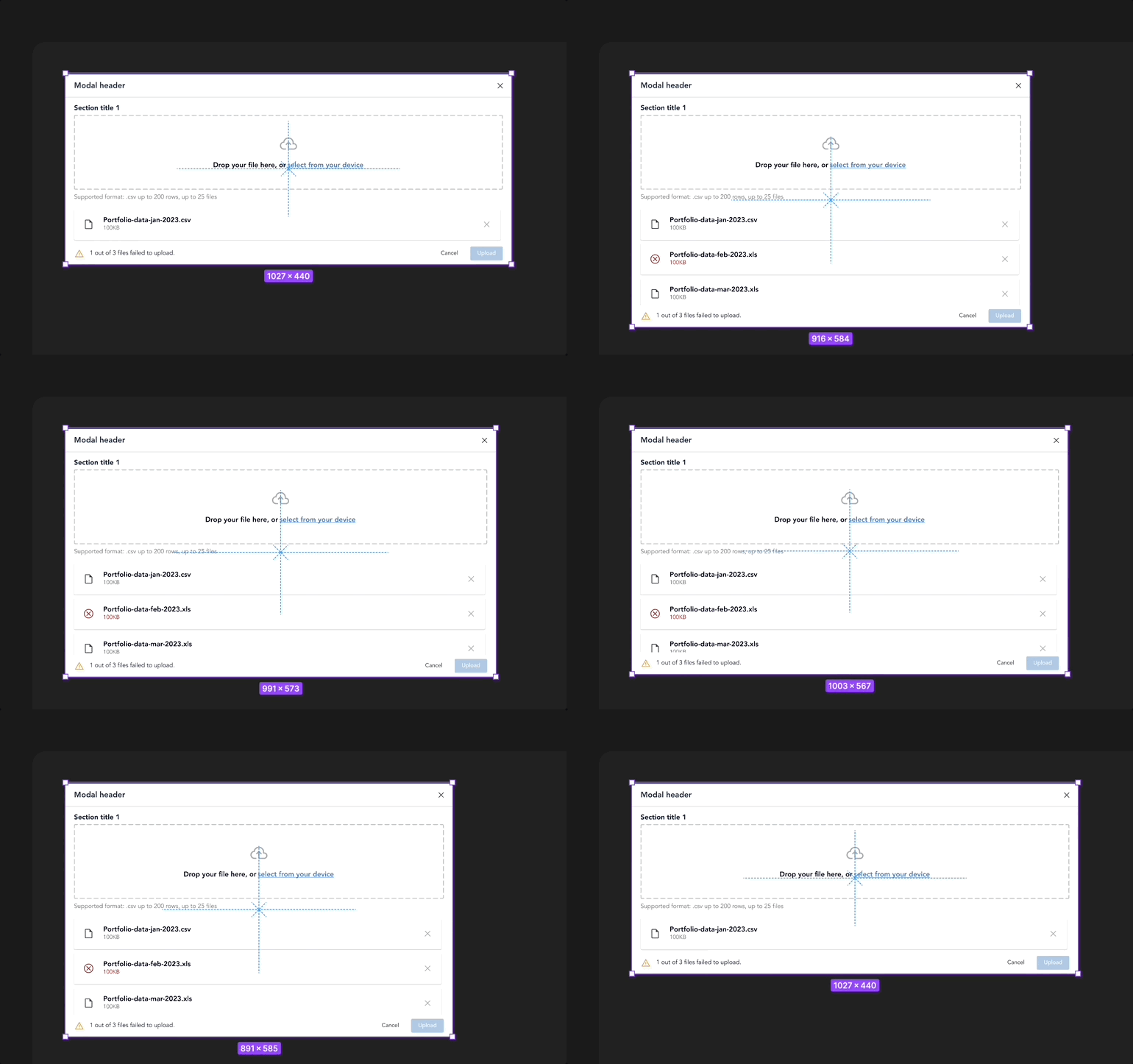
My redesign considers different use cases, which expedites the design and development process. Designers can now avoid manually customizing the design resulting in increased productivity.
The design guidelines I created fosters improved collaboration among product, design and engineering teams - It serves as a playbook for designing and implementing the file upload. This shared understanding accelerates decision making and will eliminate inconsistencies.

Through the use of Figma components and careful consideration of edge cases, the redesigned file upload isn't just a quick fix—it's a strategic move towards long-term product scalability. The design can adapt to grow with the evolving needs of CGI’s products.

In the summer of 2023, I interned at CGI, a global leader in IT and business consulting. During this internship, I played a key role in expanding their Ascent design system, which underpins seven products used by over 150 developers. This case study will take you through my journey of improving the file upload process, a project I spearheaded.
During the summer of 2023, I had the privilege of interning at CGI, a global IT and business consulting leader with a rich history of serving over 50,000 clients since its establishment in 1976. The focus of my term was expanding CGI's Ascent design system. During my time I improved 7 components from the ground up. This case study will guide you through the comprehensive process of enhancing CGI's file upload functionality—an undertaking I spearheaded from inception to completion.
The Ascent design system:
Supports
Focusing on financial management solutions
Supports
CGI designers and devs
across the globe
Spans
Components and styles a within the design system
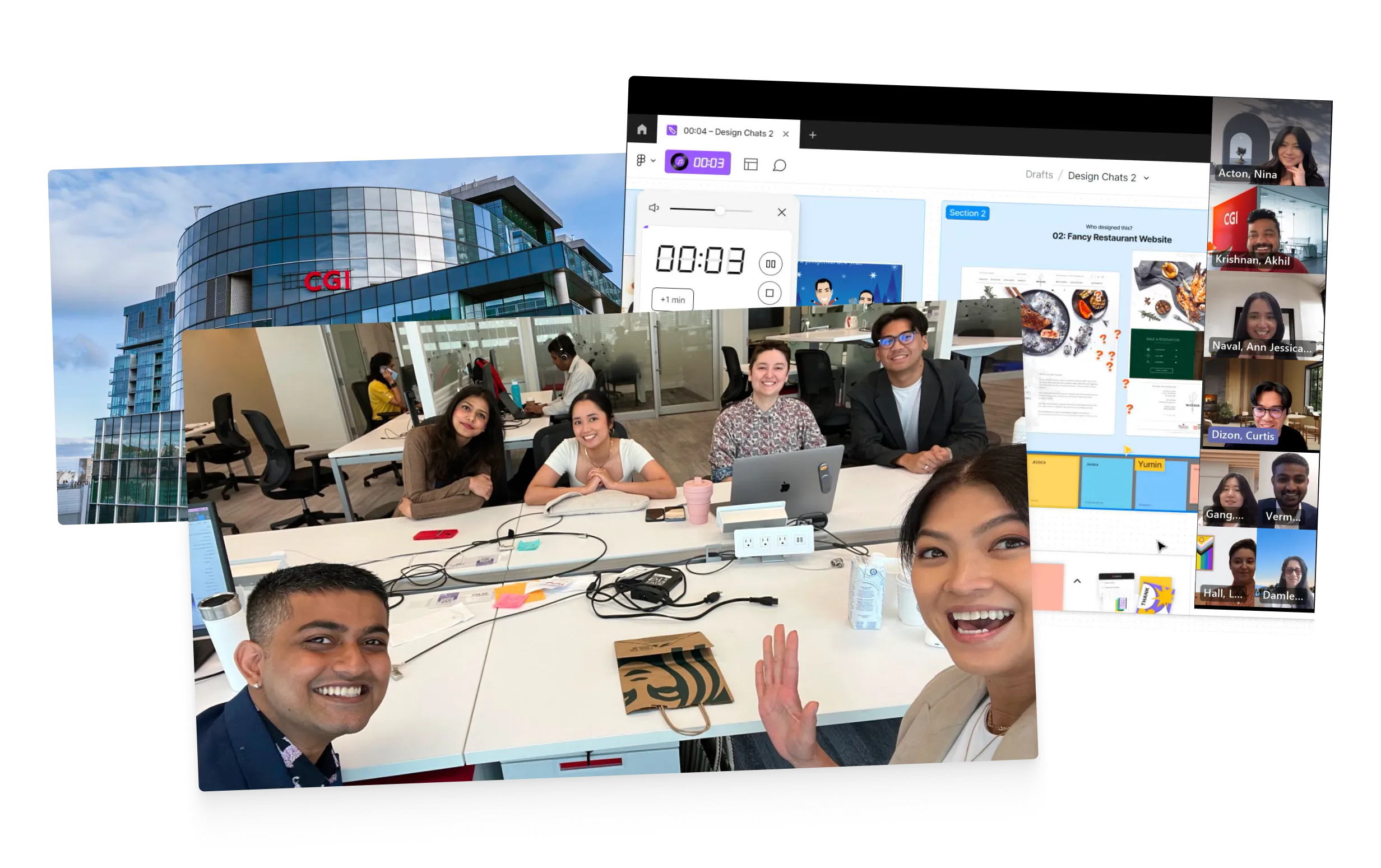
TEAM PICTURE
Throughout my design process I considered 2 major user group: end customers interacting with shipped CGI products and CGI designers/developers engaging with the file upload in the back end with Figma. These perspectives were crucial to ensure that the file upload feature not only met the immediate needs of end customers but also integrated into the design and development workflow of CGI's internal teams. Below outlines the significant tasks each user group performs with the file upload feature:
End Customers:
CGI Designers and Developers:
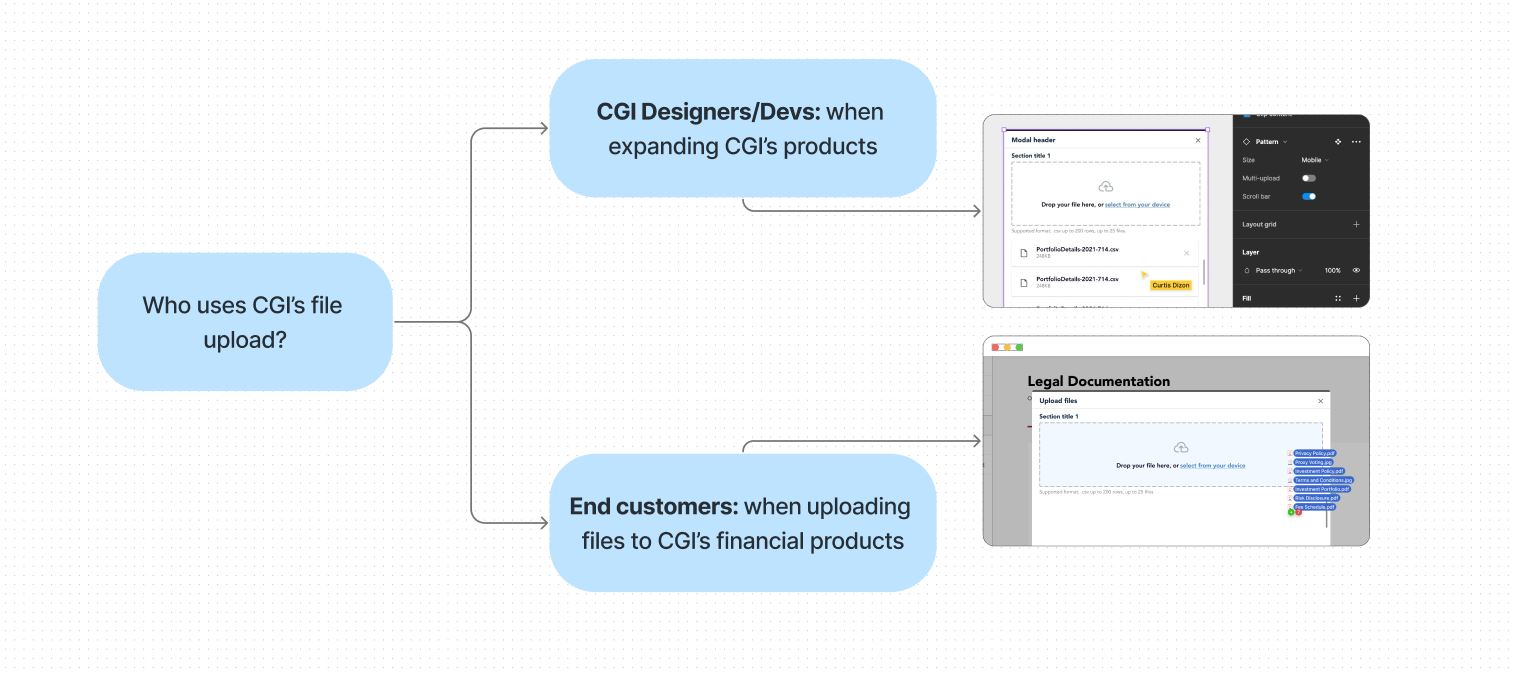
USER TYPES FOR THE FILE UPLOAD
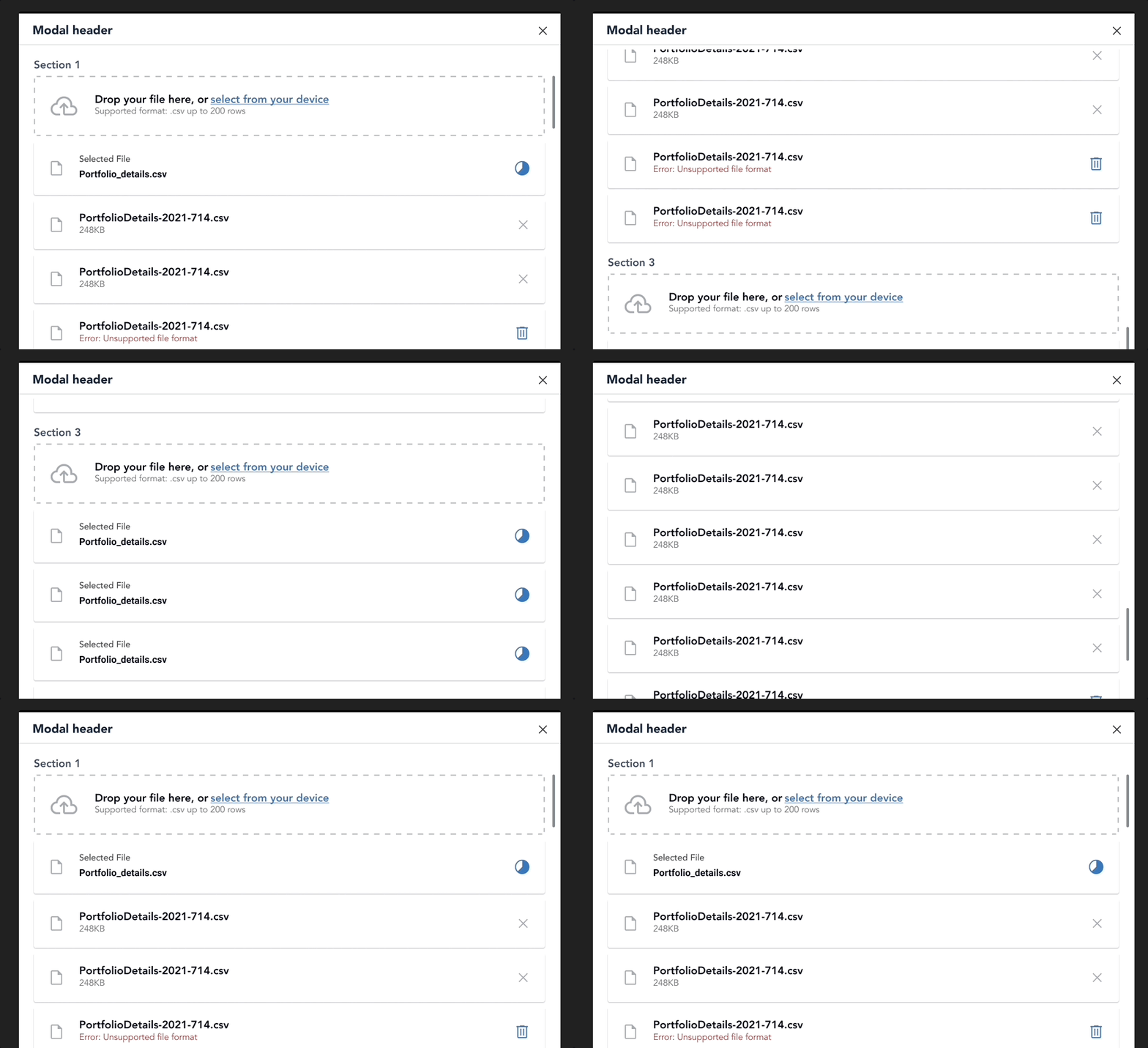
Issue: Users, such as Nick, faced challenges when uploading files across various categories to configure their products. The current design necessitated scrolling between upload sections, causing inconvenience, especially with a higher volume of uploads and potential longer onboarding times.
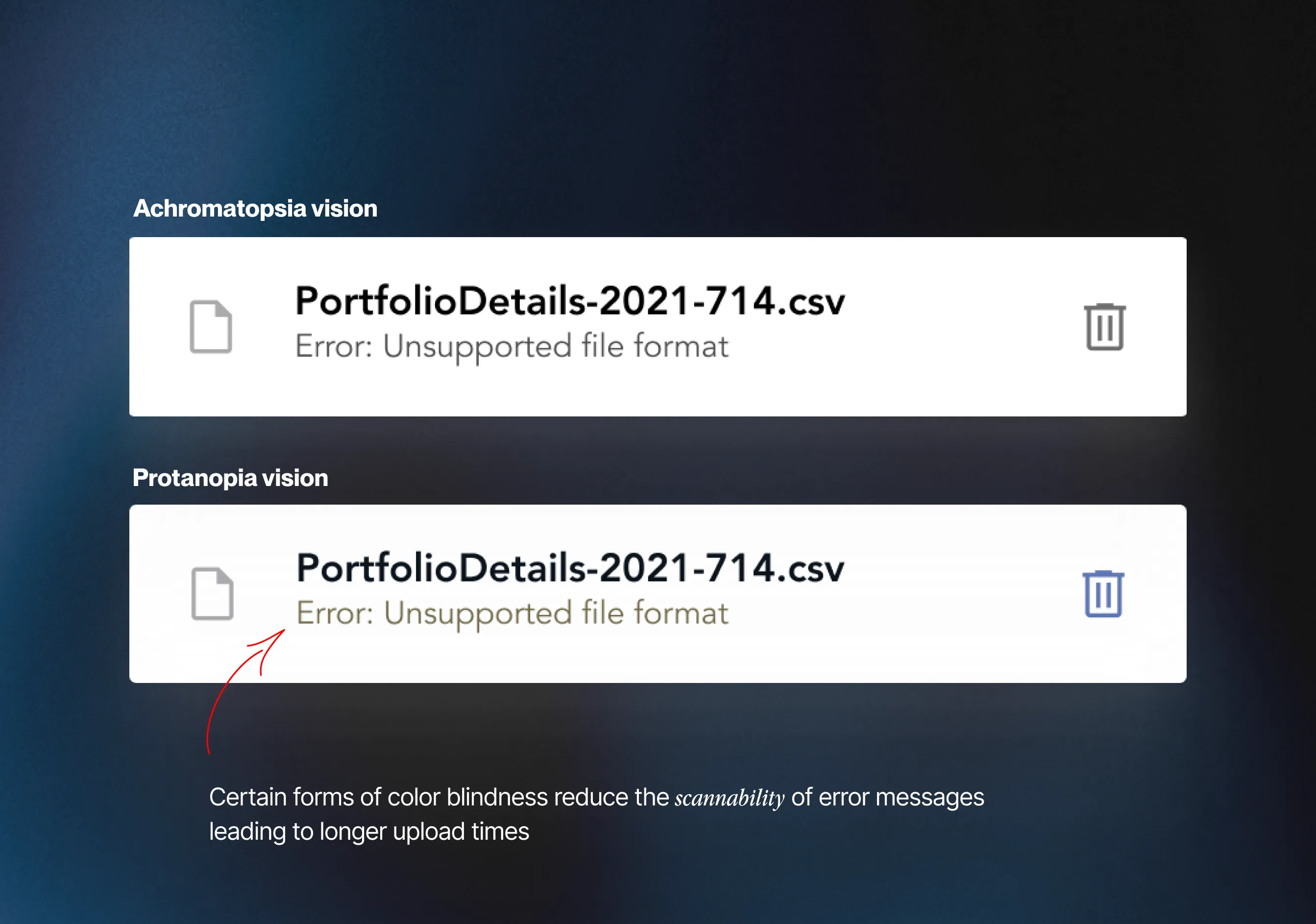
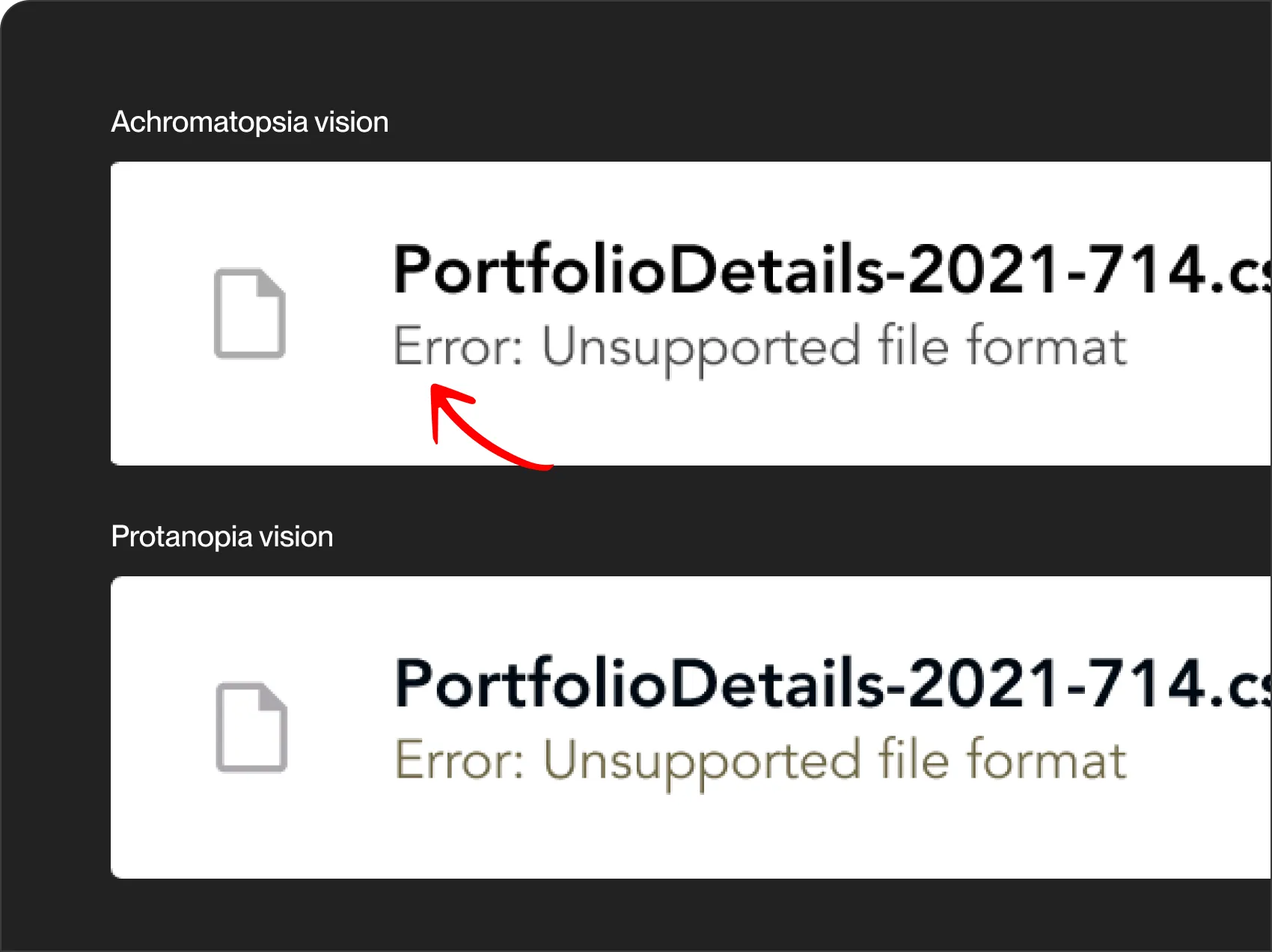
Some forms of color blindness diminished the visibility of the red hue in error text, making failed uploads difficult to identify at a glance. Additionally, successful and unsuccessful file uploads were denoted by identical icons, further complicating the distinction—especially cumbersome when managing a substantial number of uploads.
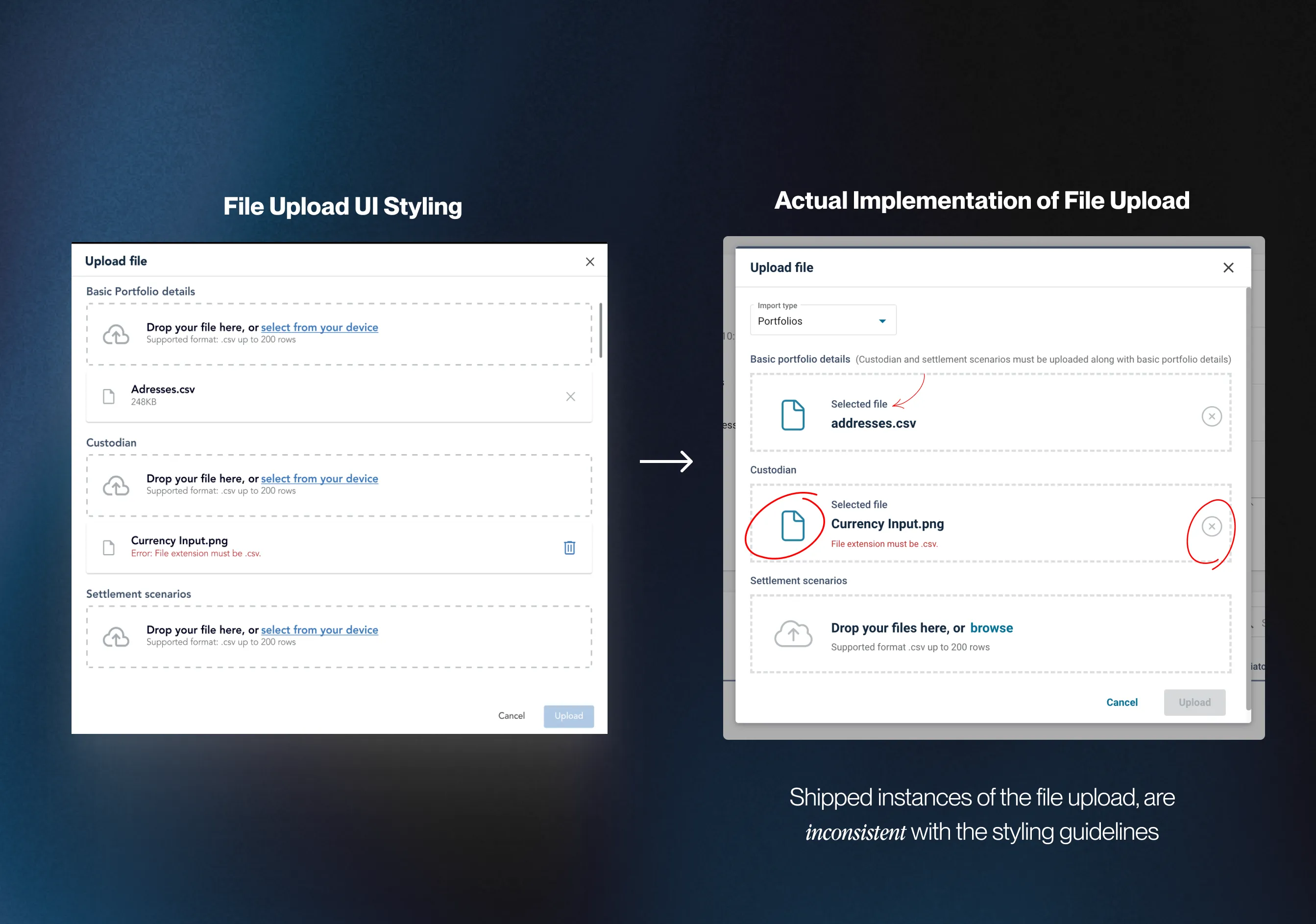
Instances of the file upload were not consistently implemented across CGI’s products, deviating from the specifications of the original design. Varied use of icons and layouts resulted in visual inconsistencies across platforms.
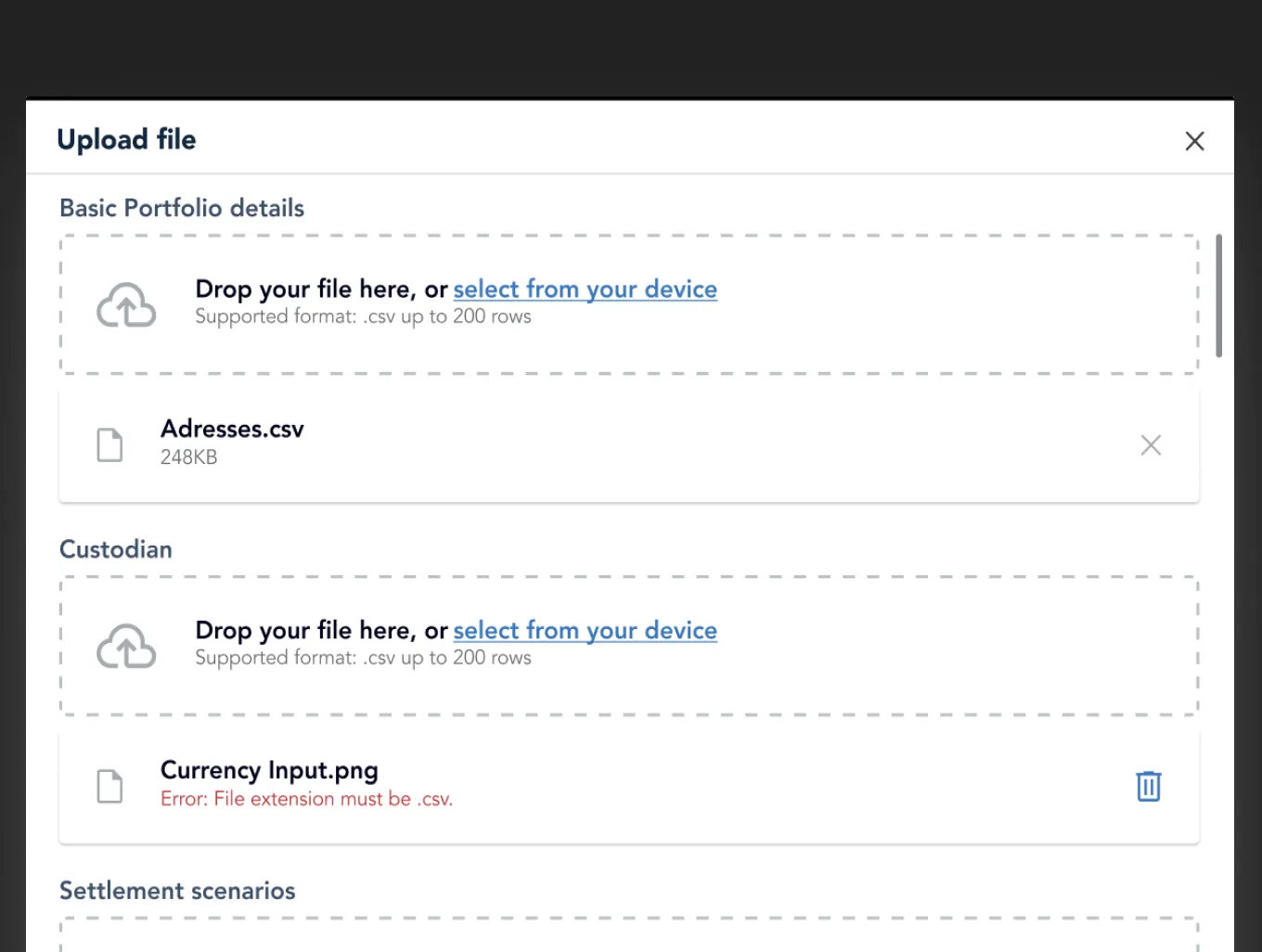

Some forms of color blindness diminished the visibility of the red hue in error text, making failed uploads difficult to identify at a glance. Additionally, successful and unsuccessful file uploads were denoted by identical icons, further complicating the distinction—especially cumbersome when managing a substantial number of uploads.
Instances of the file upload were not consistently implemented across CGI’s products, deviating from the specifications of the original design. Varied use of icons and layouts resulted in visual inconsistencies across platforms.
Issue: Users, such as Nick, faced challenges when uploading files across various categories to configure their products. The current design necessitated scrolling between upload sections, causing inconvenience, especially with a higher volume of uploads and potential longer onboarding times.
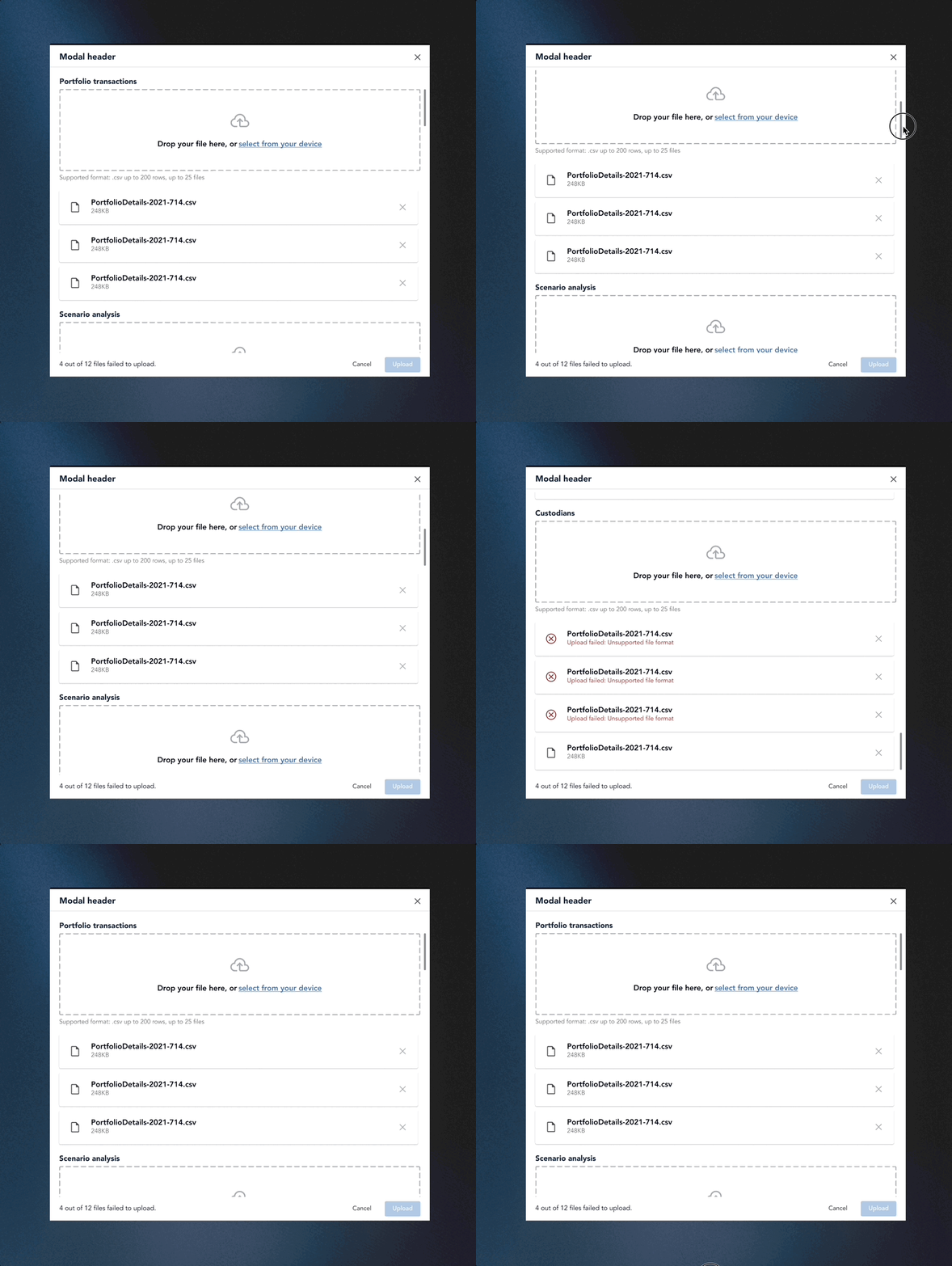
CLICK TO ENLARGE
This project marked my first time working on a design system. It was intimidating given its scale, but I came up with a 3 phase research plan to make it more manageable. The goal was to redesign the fil upload process and to do that i had to understand: CGI’s design system, how competitors handled their file upload process and any development constraints.
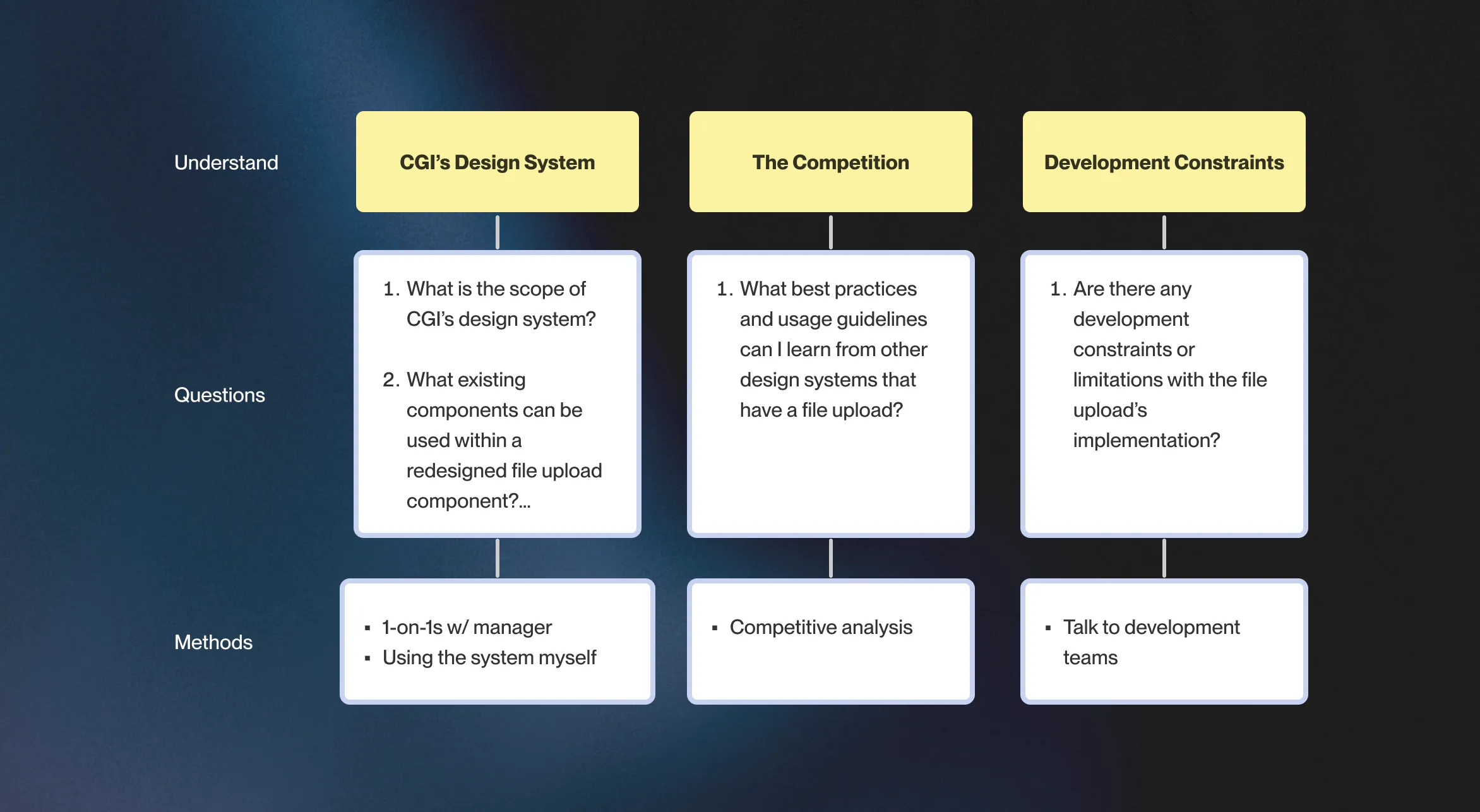
3 PHASE RESEARCH PLAN
When I joined CGI, their design department was going through changes like completing their transition to Figma and growing their design system. However, some components weren’t well-documented which was a major contributor to inconsistent development
The biggest constraint of the project was that file uploads had to be retained within a modal, as this was how it was already implemented.. Altering this approach would mean significant allocation of engineering resources. It was a case of "it is what it is," and we had to find a way to make the most out of this existing setup.
Looking at other design systems of similar maturity, I performed a competitive analysis to learn how these systems dealt with our 3 key challenges: spotting failed uploads, managing scalability, and keeping things consistent. Below is a summary of how they handled the problems:
I made a table that compared the UI of the competitors file upload component. A common theme was the use of iconography which improved scanability. However, when it came to handling uploads in multiple sections for scalability, no one had a clear example. It was a bit of uncharted territory.
To maintain consistency, I noticed that other design systems had design documents for their components. They covered everything from how things should look to the nitty-gritty details. CGI, unfortunately, didn't have something like this for file uploads. So, I took notes on how others did it – the styling, the structure, the dos and don'ts. These notes became my guide for making our design both seamless and well-documented.

Highlighting failed/errors in file uploads through iconography enables users to quickly spot any issues, especially when dealing with lots of files.

The status of file uploads should always be visible so that users can instantly tell if files failed to upload. This eliminates the need for users to scroll to check for upload errors.

Expanding the dropzone area enhances accessibility for a broader user base, including those with motor or visual impairments. A bigger dropzone makes it easier for users to drag and drop files.

Placing upload specifications outside the dropzone aligns with standard form and input field design practices. Jakob’s Law states that users are accustomed to finding instructions and guidelines outside input fields, making the design more intuitive. This approach also offers flexibility in the amount of instructional content provided.
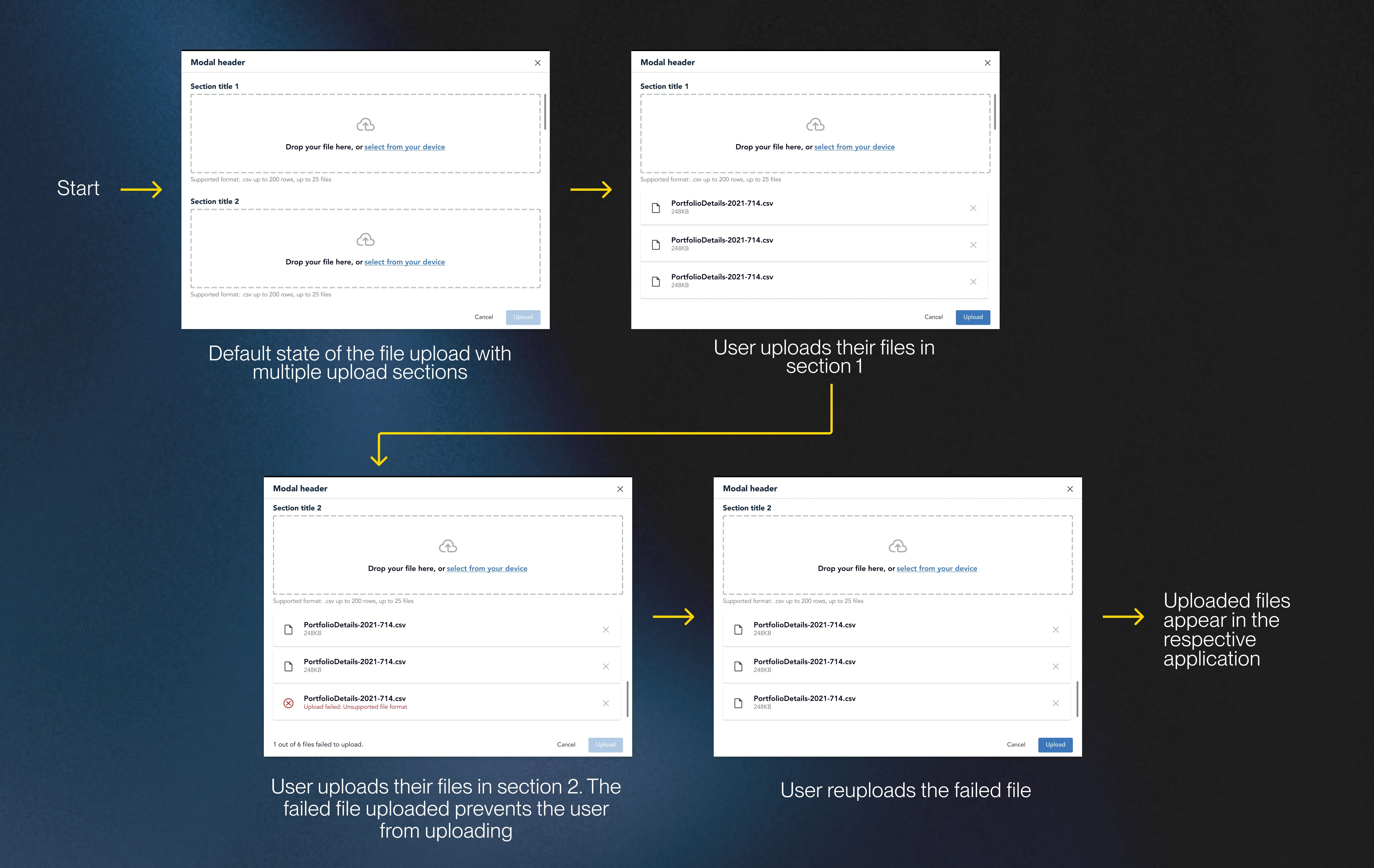
Before diving into design, I took a step back to map out the journey that end users would take during file uploads. I split their path into 2 scenarios: a straightforward single-section and the more complex multi-section uploads. Doing this allowed me to identify the various instances (ex: errors, successes and warnings) that I needed to design. From here, I used my learnings from my 3 phases of research to make the first design.

FILE UPLOAD JOURNEY MAP
REDESIGN 1 FOR THE FILE UPLOAD
Unlike other companies, CGI’s design department has a limited budget for user testing, typically reserved for high fidelity product prototypes. As a compromise, our team uses critique sessions to test designs and get actionable feedback. In total, I tested my first design with 7 users, during which I gained 2 pieces of key feedback.
Extended Scrolling Persists: “The bigger dropzone is a great addition but I think the issue of potentially scrolling for a long time is still present. As a result, users can’t easily switch between the upload sections. I recommend looking at our tabs or dropdown component”
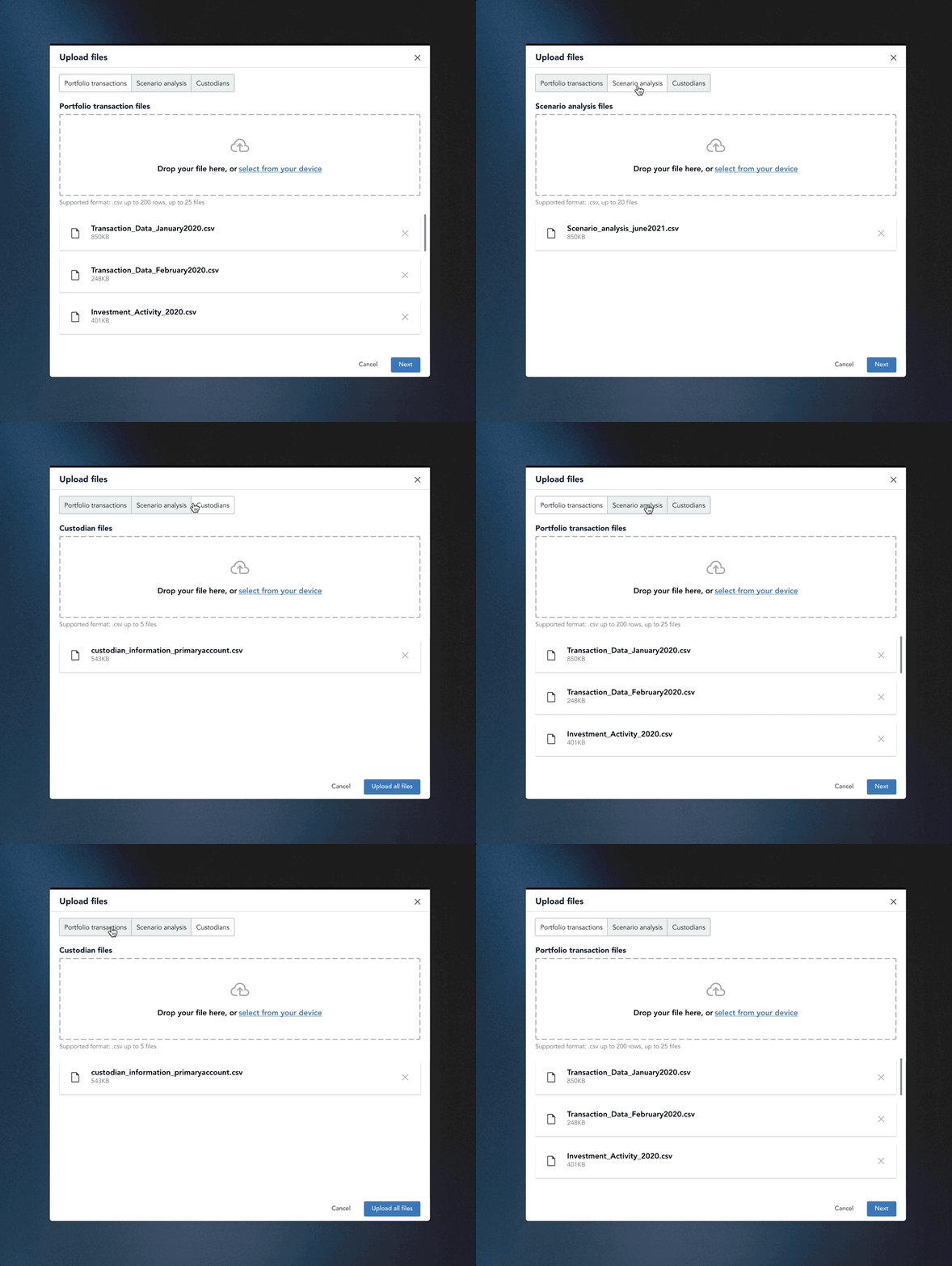
Design Rationale: Recognizing the challenge of section navigation, I introduced a toggle switch for seamless transitions between file upload sections. I chose this option instead of a dropdown so that users could efficiently change sections in 1 click as opposed to 2 clicks if it was a dropdown. Following the principles of the Gutenberg Principle ( Z-Pattern Layout), I strategically organized the modal layout, placing the primary CTA at the end of the flow guiding users to the next action.
Design Rationale: Recognizing the challenge of section navigation, I introduced a toggle switch for seamless transitions between file upload sections.I chose this option instead of a dropdown so that users could efficiently change sections in 1 click as opposed to 2 clicks if it was a dropdown. Following the principles of the Gutenberg Principle ( Z-Pattern Layout), I strategically organized the modal layout, placing the primary CTA at the end of the flow guiding users to the next action.
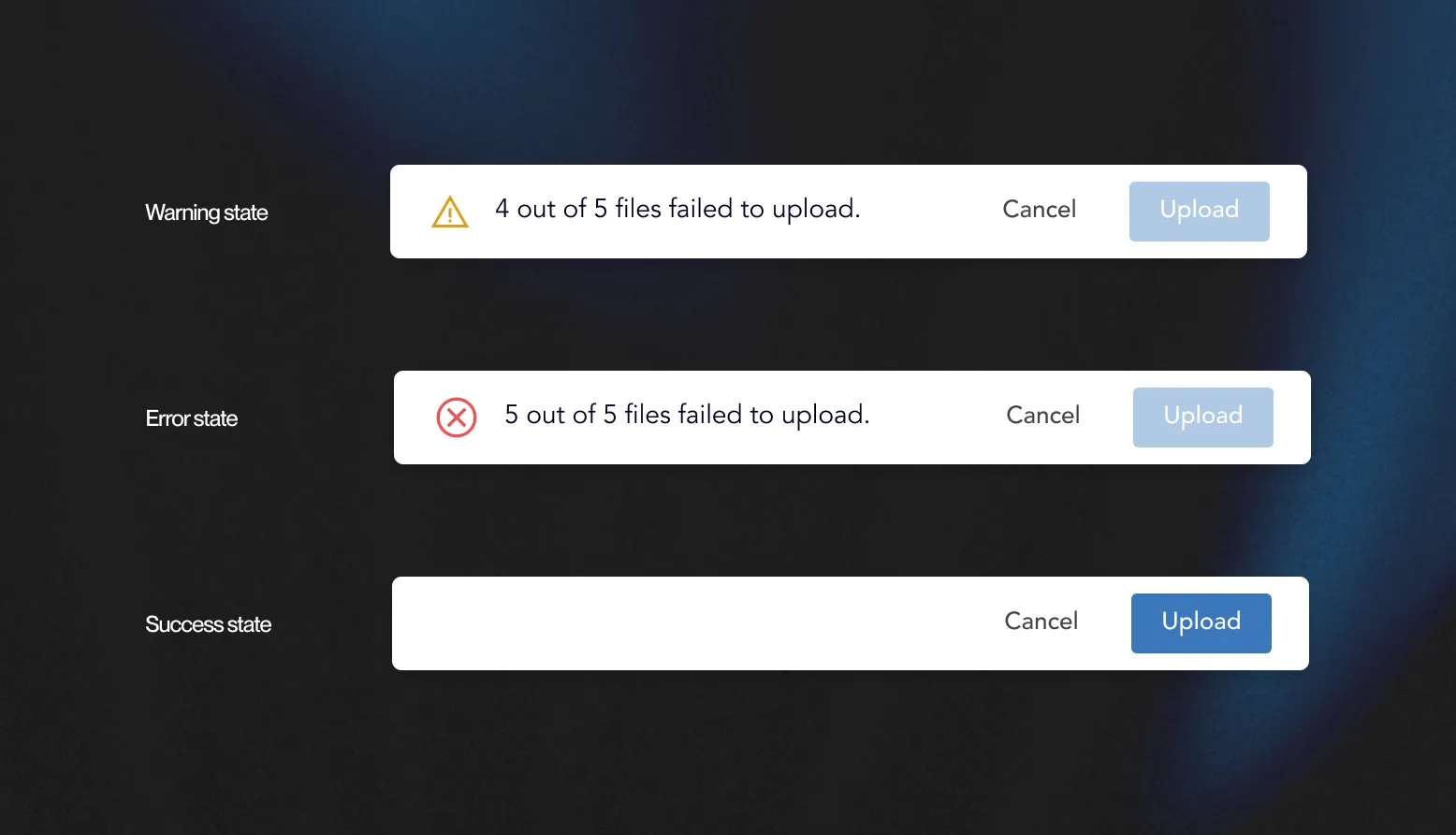
Lack of Action Bar Variation: “Maybe there’s a way to bring more attention to the bottom message for the action bar? The updated icons on the uploaded files are great and I think we can use a similar visual language for the action bar.”
Design Rationale: My first design of the action bar didn’t distinguish its states. To better improve the visibility of the system status I added icons to the receptive action bar states, which were consistent with the icons that I was already using within CGI’s design system.

Design Rationale: My first design of the action bar didn’t distinguish its states. To better improve the visibility of the system status I added icons to the receptive action bar states, which were consistent with the icons that I was already using within CGI’s design system.
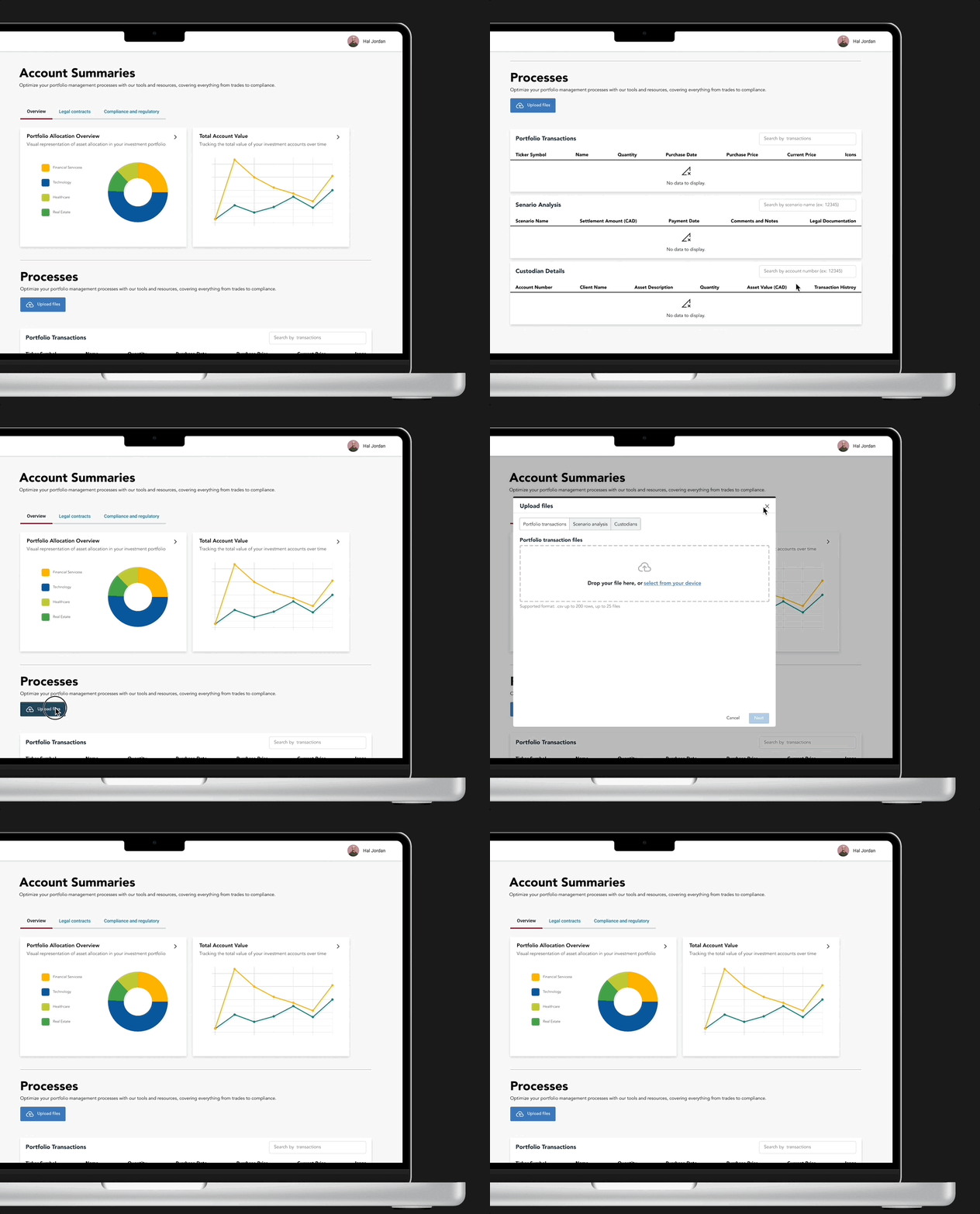
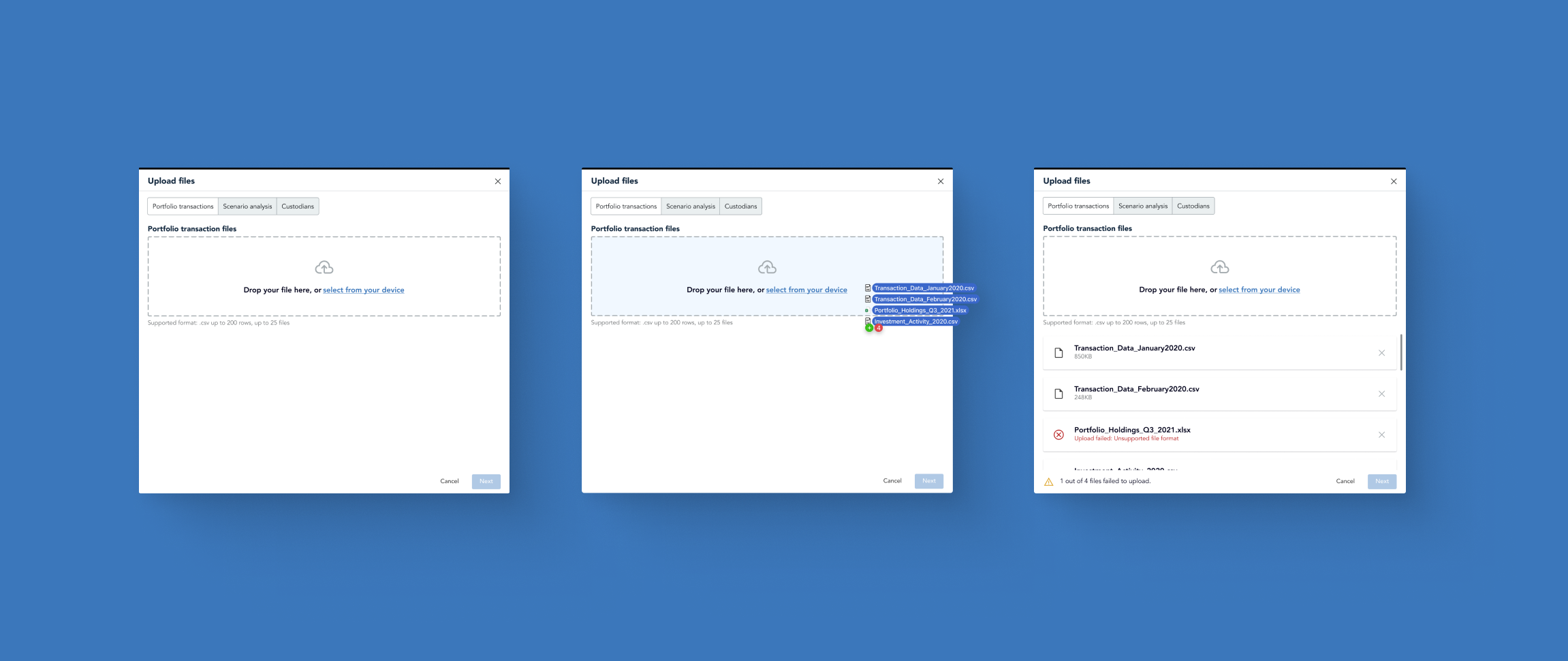
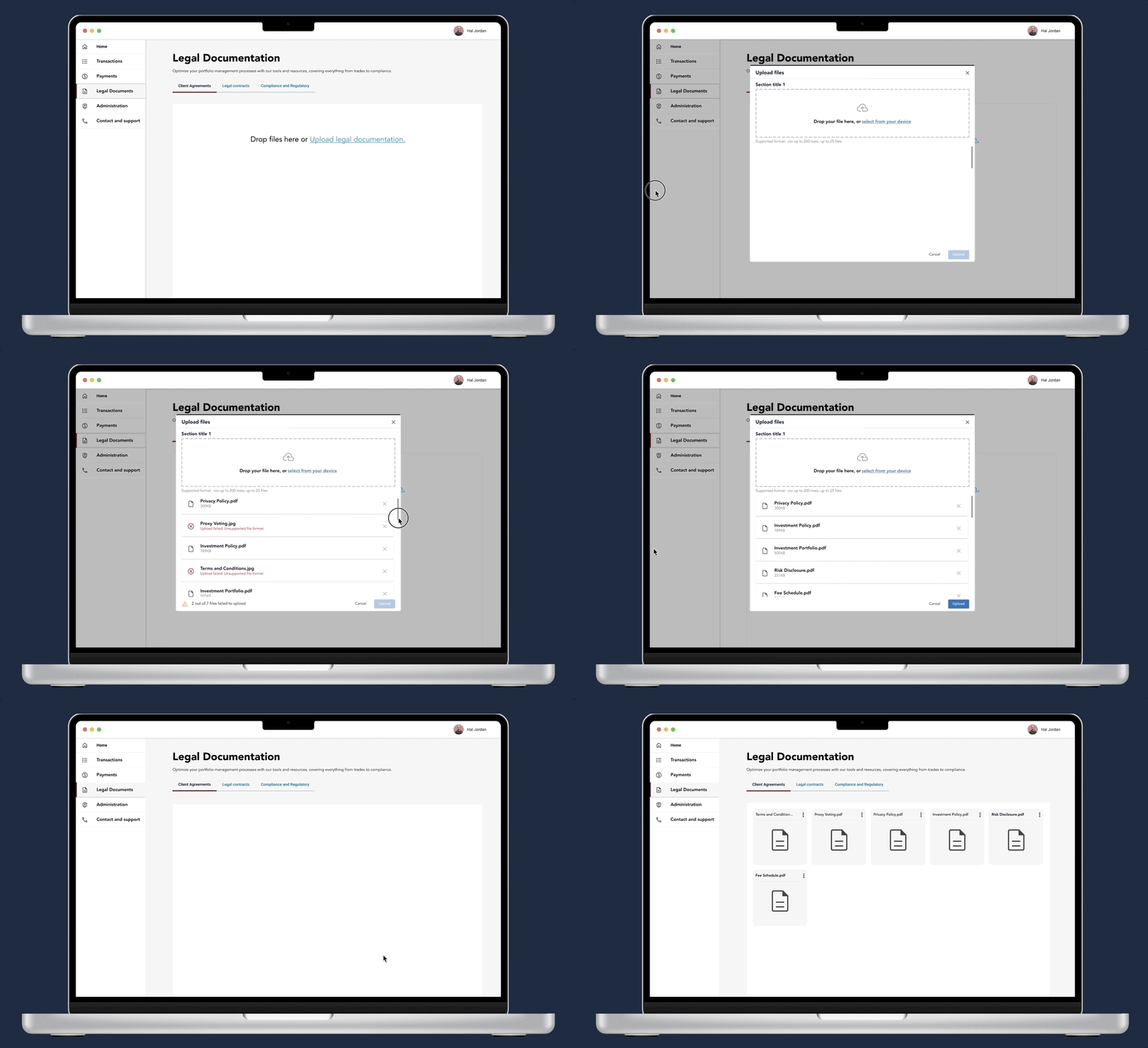
Putting all the pieces together, this is the redesigned file upload process for CGI! I made high-fi prototypes to demonstrate the flexibility of the components showing use cases for single and multi section file uploads.
Designing for multiple use cases: There were 2 main use cases for the file upload - instances where users would upload one set of files or an instance where users would upload multiple files across different categories at once.
Design Rationale: My first design of the action bar didn’t distinguish its states. To better improve the visibility of the system status I added icons to the receptive action bar states, which were consistent with the icons that I was already using within CGI’s design system.
.gif)
Considering my 2nd user group of the file upload (CGI Designers) I made tweaks using Figma’s variant and properties feature to allow our designers to easily customize the upload component - speeding up their iteration process.

MAKING QUICK CUSTOMIZATIONS WITH MY FINAL DESIGN
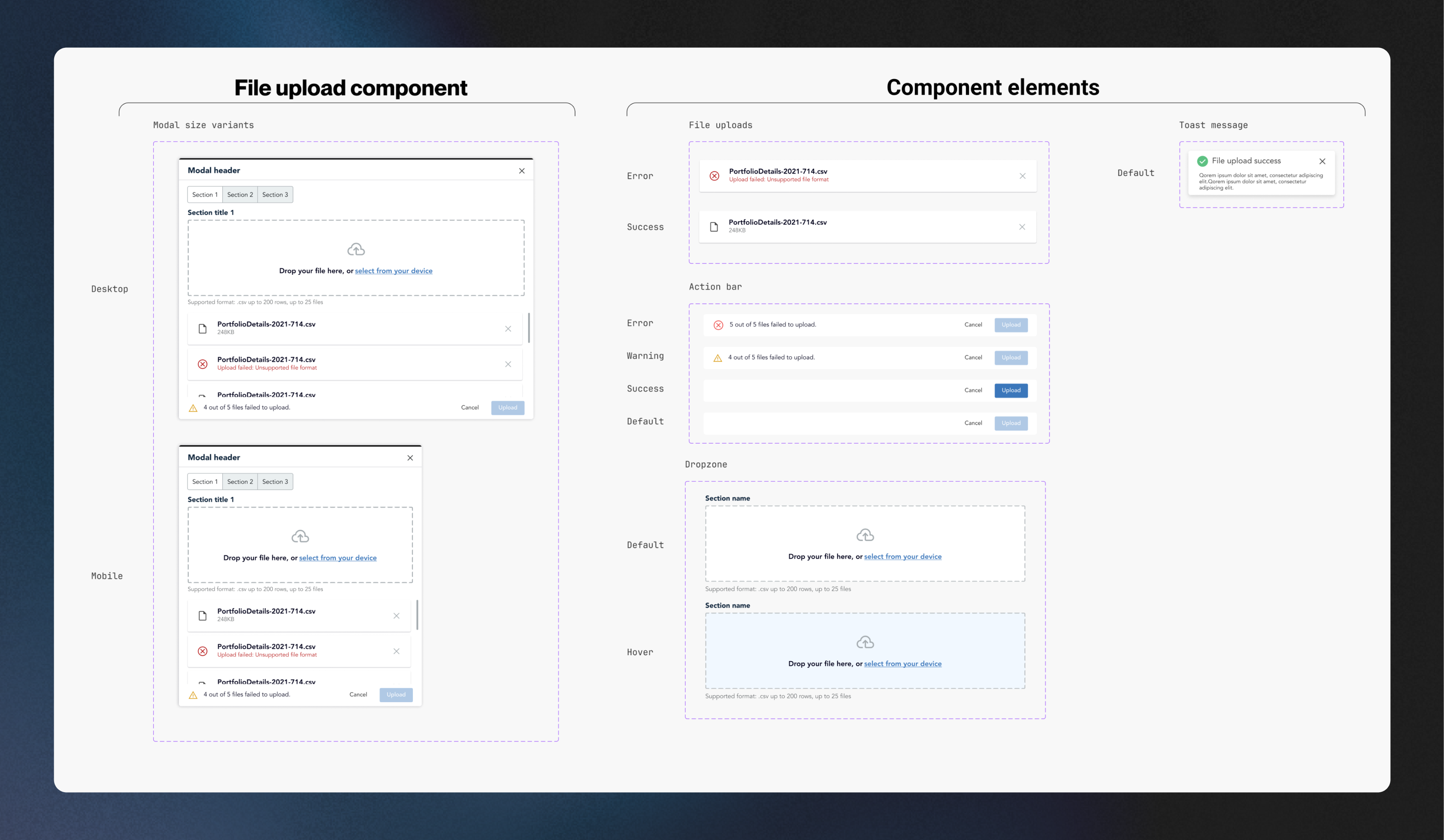
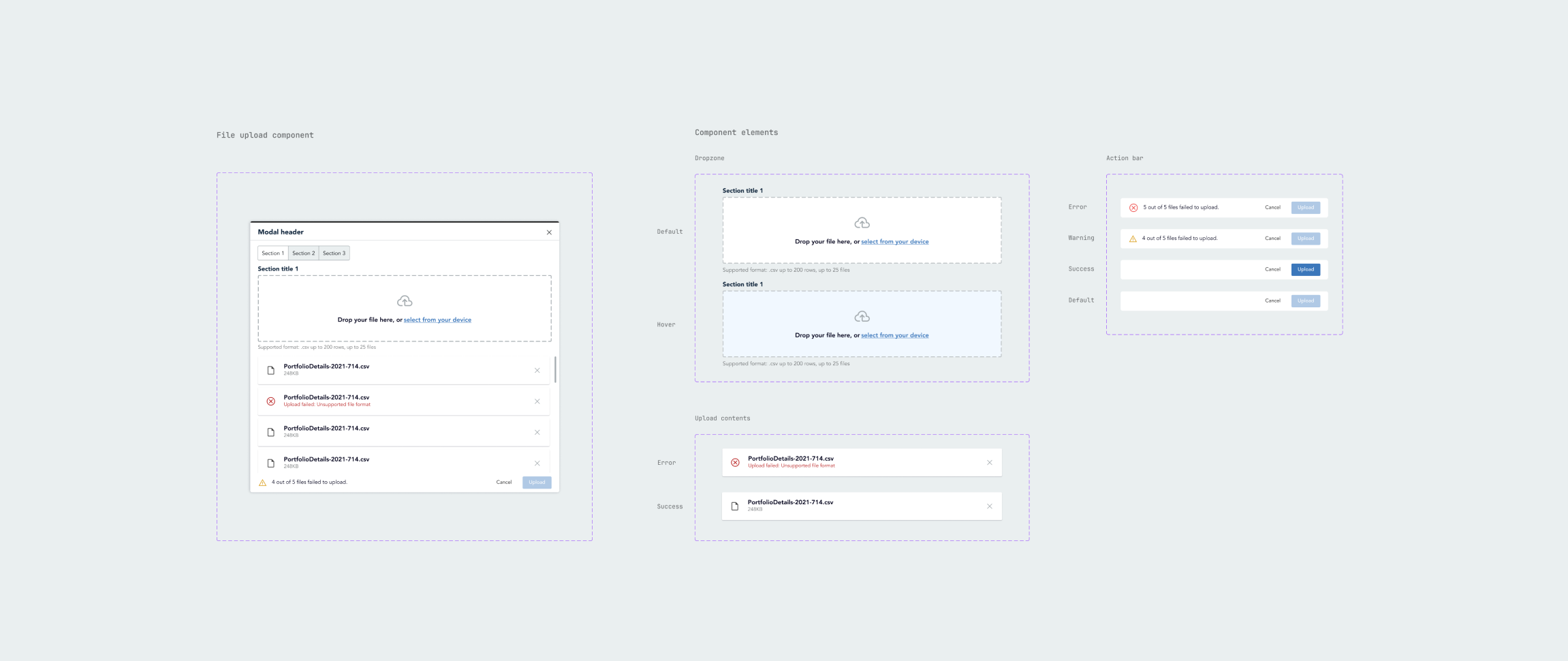
OVERVIEW OF ALL THE COMPONENTS/VARIANTS I DESIGNED
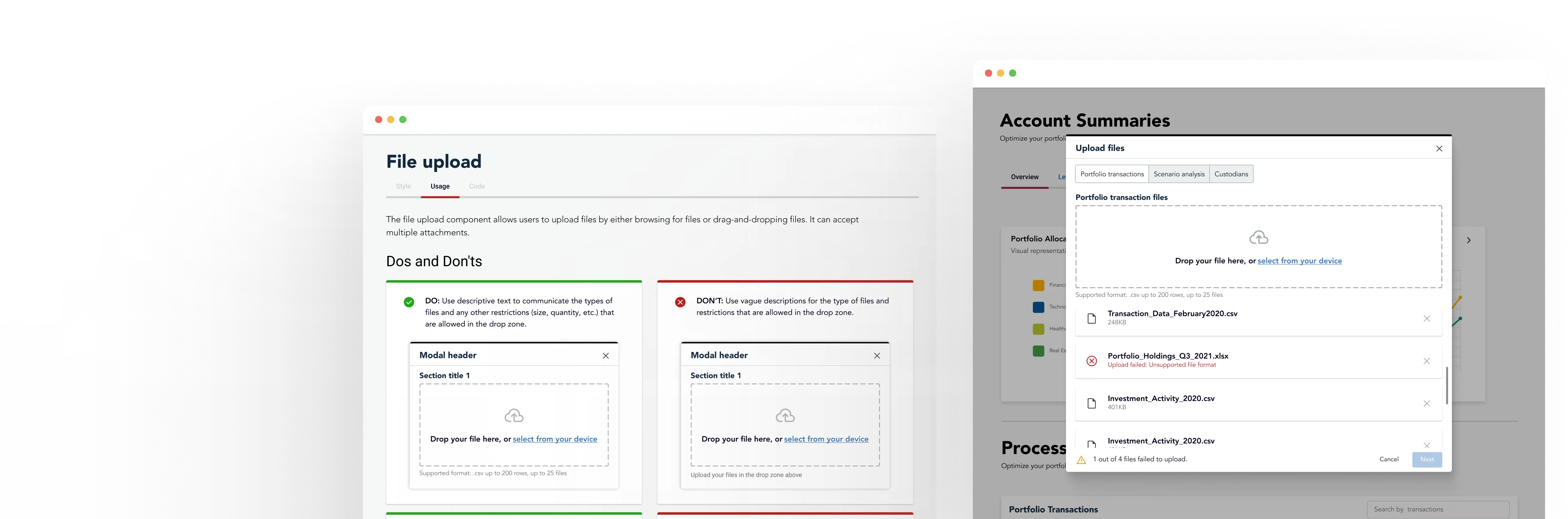
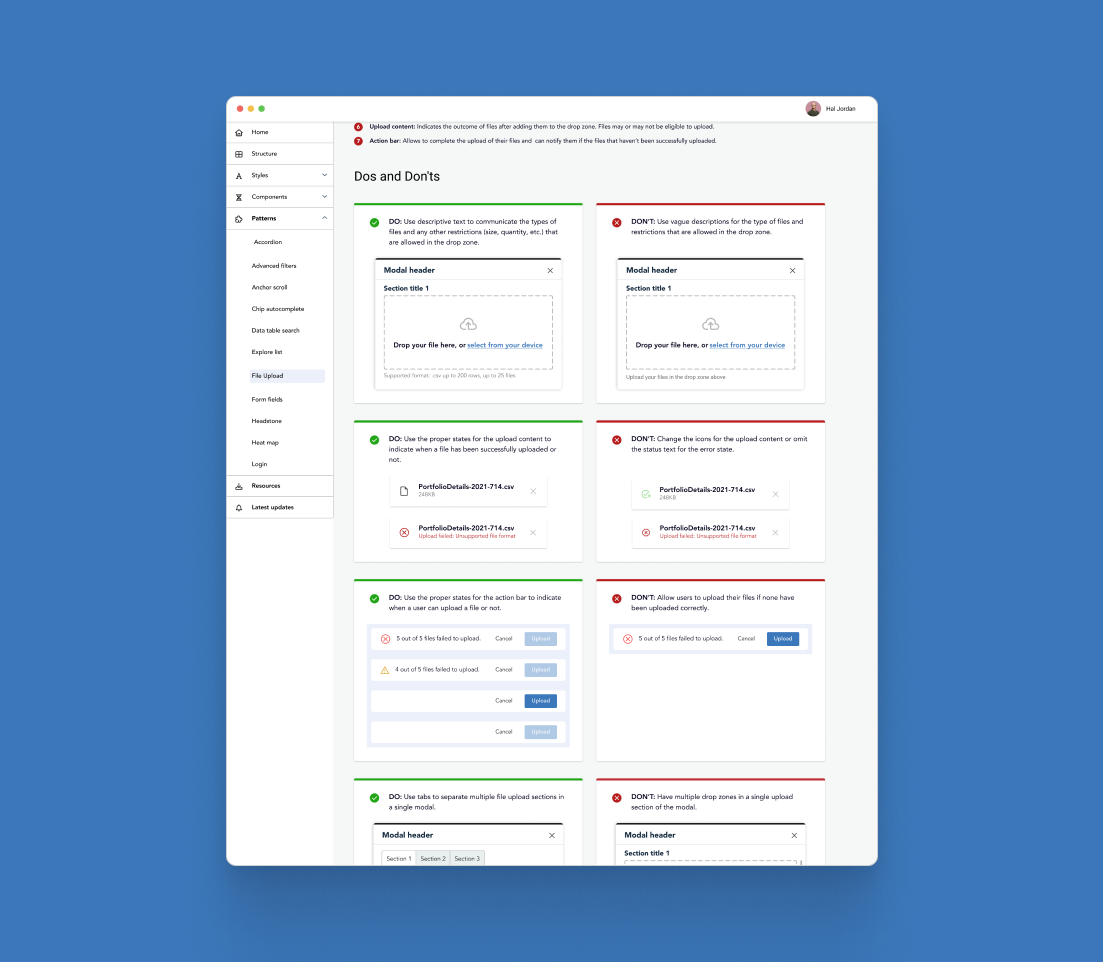
Recall that one of our main issues with the current design was that its implementation was inconsistent across our products. What was missing was a source of truth that designers, devs and PMs could refer to when implementing file uploads, So I developed a comprehensive usage and best practice guidelines to help our teams understand how to use the pattern even after my internship ended, I took inspiration from the usage documentation I discovered during phase 2 of the research.
FILE DESIGN DOCUMENTATION
Undertaking my first design systems project was quite a ride! The design process felt refreshingly different from what I was used to, but it gave me a solid grasp of how designs are developed. Here are my top three takeaways:
Building these components tested my interaction design skills, highlighting the importance of understanding design behavior. Specifically, looking at how designs behave with edge cases and device responsiveness helped me improve my designs.
This project was unique because I got to work with developers closely. Building rapport with them was essential to understand the limitations of designs so that I had context while creating the components.
One lesson my manager taught me emphasized the significance of explaining design decisions with research. In the realm of UI design, I discovered the effectiveness of looking at existing patterns for components (ex: file uploads) as a baseline. These established patterns, tested countless times and widely adopted across different platforms, resonate with users due to their familiarity.